Posted on Monday, October 19, 2009
Filed under
Internet tools,
programs and computer applications
|
Orbit is an indispensable tool for download acceleration. It has a smart download logic accelerator that features intelligent dynamic file segmentation and safe P2P downloading technology to accelerate your downloads. It is a light-weight,powerful and easy-to-use application.
Also it is well-known for its intuitive and user-friendly interface. Most of the features present in other download manager clients are present in orbit, including bandwidth prioritization, proxy servers, download categories, queue processor, enhanced virus protection on download completion.
Additionally, Orbit Can get flash games and audio/video from Web pages and grab videos from YouTube or other video sites.
Features:
Make Youtube video download more smoothly!
More Efficient mirrors selection algorithm and faster download sources!
Maximum possible download speed, up to the fastest download manager!
Download social music and video include Youtube, Pandora, Myspace easily
Support all streaming media protocol include RTMP/ MMS/ RTSP
Support all popular browsers include Firefox 3 Beta
Download social music, social video and streaming media
Extreme download acceleration.
Super Light: micro-sized and resource-friendly
Support RapidShare download.
Support IE, Firefox, Maxthon, Opera.
Support Metalink download.
Support HTTP, HTTPS, FTP, MMS, RTSP and RTMP protocols.
Support Proxy server configuration.
Support download pasue and resume.
General download management.
System Requirements:
64 MB of RAM
6 MB of free disk space
Microsoft Windows NT /2000 /XP /2003 /Vista
Supports: Internet Explorer 5.0 and above, FireFox 1.5 and above including FireFox3(Gran Paradiso), Opera, Maxthon and Netscape
What's New in version 2.8.17:
Add: 'OneClick YouTube Downloader' add-on on Firefox
Improve: The process of 'GetIt' button
Fix: some bugs may cause IE crash when operating Grabpro
Download
These icons link to social bookmarking sites where readers can share and discover new web pages.
Posted on Tuesday, October 13, 2009
Filed under
Internet tools,
programs and computer applications
|
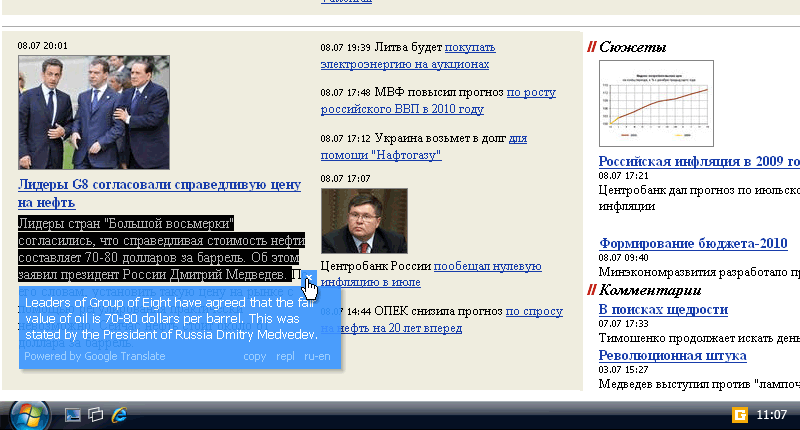
Google Translate is the most widely used free translation service. But translating a webpage or a piece of text can still be a tiresome process: you need to visit Google Translator website, copy/paste the text, choosing the language... Too long!
Client for Google Translate is a free translator which translate text in every Windows application such as Outlook, MS Word, Internet Explorer, Firefox and so on.
After installing you will see Client for Google Translate in the system tray and every time you want to translate some text, all you have to do is select it - the text will be translated instantly!
Version: 3.1.83
Release Date: 2009-07-13
Size: 2.0 MB
OS: Windows (98, 2000, XP, Vista, 7)
Sys. Requirements: Internet connection
License: Freeware
Download
These icons link to social bookmarking sites where readers can share and discover new web pages.
Filed under
Internet tools,
programs and computer applications
|
DSL Speed is a prefessional tool that will online smart optimize your DSL (e.g., ADSL, G.lite, IDSL, SDSL) connection speed to MAX.
DSL Speed is for DSL PPPOE only prefessional tool and does not support the PPPOA NOR modem dialup networking.DSL Speed is a program that helps you optimize your DSL connection speed.
Here are some key features of "DSL Speed":
· Online Verify Your ISP's MTU And Your DSL Unique Optimize Value.
· Online And Offline Optimize Your DSL Connection Speed To MAX.
· Faster loading Web Pages.
· Tweaks DNS Errors Caching In Windows 2000/XP.
· Tweaks ICS In Windows 98SE.
Requirements:
· TCP / IP Networking installed and bound to one or more network adapters
· Windows Sockets 2.0
· PPPOE
Download
These icons link to social bookmarking sites where readers can share and discover new web pages.
Posted on Monday, September 28, 2009
Filed under
Internet tools,
programs and computer applications,
tool and utilities
|
You are loved download files from the internet .. sure you know with this one program

Internet Download Manager has a smart download logic accelerator that features intelligent dynamic file segmentation and safe multipart downloading technology to accelerate your downloads. Unlike other download accelerators and managers that segment files before downloading starts, Internet Download Manager segments downloaded files dynamically during download process. Internet Download Manager reuses available connections without additional connect and login stages to achieve better acceleration performance. Internet Download Manager supports proxy servers, ftp and http protocols, firewalls, redirects, cookies, authorization, MP3 audio and MPEG video content processing. IDM integrates seamlessly into Microsoft Internet Explorer, Netscape, MSN Explorer, AOL, Opera, Mozilla, Mozilla Firefox, Mozilla Firebird, Avant Browser, MyIE2, and all other popular browsers to automatically handle your downloads. You can also drag and drop files, or use Internet Download Manager from command line. Internet Download Manager can dial your modem at the set time, download the files you want, then hang up or even shut down your computer when it's done.
Other features include multilingual support, zip preview, download categories, scheduler pro, sounds on different events, HTTPS support, queue processor, html help and tutorial, enhanced virus protection on download completion, progressive downloading with quotas (useful for connections that use some kind of fair access policy or FAP like Direcway, Direct PC, Hughes, etc.), built-in download accelerator, and many others.
Main Features:
• All popular browsers and applications are supported! Internet Download Manager has been tested with the following browsers: Internet Explorer, MSN Explorer, AOL, Netscape Communicator, Netscape 6, Netscape 7, Mozilla, Mozilla Firefox, Mozilla Firebird, Opera, NetCaptor, UltraBrowser, Slim Browser, Avant Browser, MyIE2, Optimal Desktop, Ace Explorer, Advanced Browser, 27 Tools-in-1 Wichio Browser, WindowSurfer, 550 Access Browser, FineBrowser Freeware, Kopassa Browser, Fast Browser Pro, Enigma Browser, GoSuRF, K-Meleon, Smart Explorer, The Off By One Web Browser, Smartalec Voyager, CrystalPort AppCapture, The Family Browser, XANA Web Browser, Bluto, AutoSurf, 32bit Web Browser, BrowseMan, WrestlingBrowser, Eminem Browser, UltraBrowser, Cygsoft LDAP Browser, and Net M@nager. Internet Download Manager supports all versions of popular browsers, and can be integrated into any 3rd party Internet applications.
• Easy downloading with one click. When you click on a download link in a browser, IDM will take over the download and accelerate it. IDM supports HTTP, FTP, HTTPS and MMS protocols.
• Download Speed Acceleration. Internet Download Manager can accelerate downloads by up to 5 times due to its intelligent dynamic file segmentation technology. Unlike other download managers and accelerators Internet Download Manager segments downloaded files dynamically during download process and reuses available connections without additional connect and login stages to achieve best acceleration performance.
• Download Resume. Internet Download Manager will resume unfinished download from the place where they left off.
• YouTube grabber. Internet Download Manager can grab FLV videos from popular sites like YouTube, MySpaceTV, and Google Video.
• Simple installation wizard. Quick and easy installation program will make necessary settings for you, and check your connection at the end to ensure trouble free installation of Internet Download Manager
• Drag and Drop. You may simply drag and drop links to IDM, and drag and drop downloaded files out of Internet Download Manager.
• Automatic Antivirus checking. Antivirus checking makes your downloads free from viruses and trojans.
• Advanced Browser Integration. When enabled, the feature can be used to catch any download from any application. None of download managers have this feature.
• Built-in Scheduler. Internet Download Manager can connect to the Internet at a set time, download the files you want, disconnect, or shut down your computer when it's done.
• IDM includes web site spider and grabber. IDM downloads all required files that are specified with filters from web sites, for example all pictures from a web site, or subsets of web sites, or complete web sites for offline browsing. It's possible to schedule multiple grabber projects to run them once at a specified time, stop them at a specified time, or run periodically to synchronize changes.
• IDM supports many types of proxy servers. For example, IDM works with Microsoft ISA, and FTP proxy servers.
• IDM supports main authentication protocols: Basic, Negotiate, NTLM, and Keberos. Thus IDM can access many Internet and proxy servers using login name and password.
• Download All feature. IDM can add all downloads linked to the current page. It's easy to download multiple files with this feature.
• Customizable Interface. You may choose the order, and what buttons and columns appear on the main IDM window.
• Download Categories. Internet Download Manager can be used to organize downloads automatically using defined download categories.
• Quick Update Feature. Quick update may check for new versions of IDM and update IDM once per week.
• Download limits. Progressive downloading with quotas feature. The feature is useful for connections that use some kind of fair access policy (or FAP) like Direcway, Direct PC, Hughes, etc.
• IDM is multilingual. IDM is translated to Albanian, Arabic, Azerbaijan, Bosnian, Bulgarian, Chinese, Croatian, Czech, Danish, Dutch, Farsi, French, German, Greek, Hebrew, Hungarian, Italian, Japanese, Korean, Lithuanian, Macedonian, Norwegian, Polish, Portuguese, Romanian, Russian, Serbian, Slovak, Slovenian, Spanish, Thai, Turkish, and Uzbek languages.
please read "READ ME.text" is in your file downloads
Download
These icons link to social bookmarking sites where readers can share and discover new web pages.