Posted on Thursday, October 29, 2009
Filed under
Audio and Video Tools,
programs and applications portable
|
Simply Create, Rip, Burn, Copy, Share, Backup, Play, and Enjoy! Nero 9, the easy-to-use yet powerful multimedia suite, gives you the freedom to create, rip, copy, burn, edit, share, and upload online. Whatever you want ? music, video, photo, and data ? share and enjoy with family and friends anytime, anywhere.
Nero 9 is the next generation of the world?s most trusted integrated digital media and home entertainment software suite. It features new cutting-edge functionality that makes enjoying digital media content simple. This easy-to-use yet powerful multimedia suite, gives you the freedom to create, rip, copy, burn, edit, share, and upload online. Whatever you want ? music, video, photo, and data ? enjoy and share with family and friends anytime, anywhere. With easy-to-use Nero StartSmart command center, your digital life has never been more flexible, feasible, and fun.
Nero 9 Highlights:
- Fast and easy rip, burn, Autobackup, and copy functions
- Backup files to CDs, DVDs, and Blu-ray Discs*
- Create professional-looking DVD movies with integrated 3D menus
- Copy, burn, share, upload, and create music mixes like a DJ
- Convert music, photos, and DVDs to play on your iPod? and other mobile devices
- Quick photo and video upload to My Nero, YouTube?, and MySpace
- Watch, record, pause, and customize your live TV experience
- Play AVCHD and other HD formats
Creative Projects Are Easier than Ever
Using the intuitive Nero StartSmart command center of Nero 9, your digital life has never been more flexible, feasible, and fun. You directly access features and perform one-click functions such as Audio Ripping, Burning, Copying, and AutoBackup, with optimized performance for Windows Vista? with Nero DiscCopy Gadget and Nero Live (TV) for Windows Vista Sidebar.
Fully Enjoy Your Content at Home, Online and On-the-go
Whether it?s video, photo, or music, you can convert and share everything your imagination creates in your digital world. Convert & share multimedia files to play on iPod?, PSP?, and upload online your coolest photos and videos to share with online communities like My Nero, YouTube?, and MySpace.
Make Your PC a Dynamic Home-Entertainment Device
Experience TV from the comfort of your sofa with state-of-the-art TV technology, even for HDTV and DVB Radio. Pause, record, schedule, manage, and playback your TV shows.
Best in the Business Software Gets Better
The ripping and burning capabilities of Nero 9 are the most reliable in the industry. Burn and copy to CD, DVD, Blu-ray Disc ? even copy movies*. With DVD-R Dual Layer and DVD+R Double Layer support, you?ll get more data on a disc than ever before!*
Trusted and Reliable ? Backup, Restore, and Secure
Don?t lose your valuable memories and important files to life?s potential hazards, system crash, or risky hardware. Backing up, securing, and managing files and data is a point-and-click away.
Download
These icons link to social bookmarking sites where readers can share and discover new web pages.
Posted on Friday, October 23, 2009
Filed under
Audio and Video Tools,
programs and computer applications
|
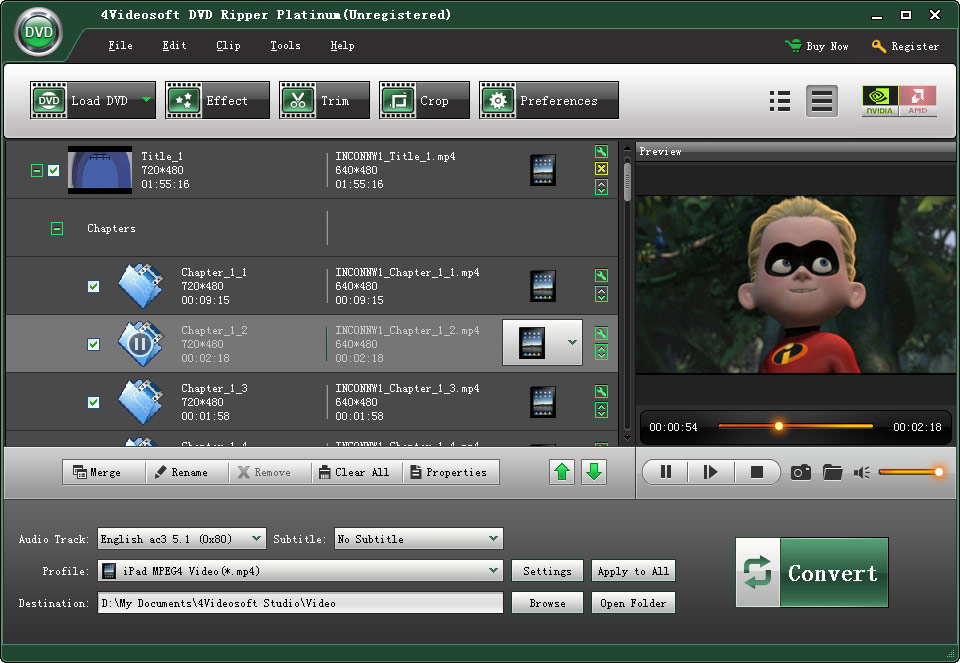
4Videosoft DVD Ripper Platinum is best DVD Ripper, DVD Rip software to rip DVD to AVI, rip DVD to MP4, rip DVD to MPEG, MOV, 3GP, MP3 etc with super fastest DVD ripping speed. Therefore, with this DVD Ripper software you are easy to put your DVD on iPod, iPhone, PSP, Apple TV, Zune, BlackBerry etc with excellent sound and image quality. This DVD rip software gives you strong editing functions: Trim, Crop, Effect, Merge into one file, Take snapshot, Select audio track and subtitle.
4Videosoft DVD Ripper Platinum is the best DVD Ripper and DVD rip software to rip your DVD, and make your DVD compatible and portable with your Windows Mobile devices.
Key Functions
1.Rip DVD to all popular video and audio formats
4Videosoft DVD Ripper Platinum can rip DVD to AVI, MP4, MPEG, WMV, 3GP, HD video(HD AVI, HD TS, HD MOV, HD WMV?), etc, and extract audio from DVD to AAC, AC3, AIFF, AMR, AU, FLAC, MP3, M4V, MP2, OGG, WAV, WMA audio formats.
2.Set video effect and Deinterlacing
4Videosoft DVD Ripper Platinum allows you to adjust the video effect: video Brightness, Contrast, Saturation and check Deinterlacing to upgrade your video quality by using the Deinterlacing technology - eliminate some jaggedness from the interlacing video.
3.Trim DVD Movie
4Videosoft DVD Ripper Platinum has the trim function. It means that you can get any time-length segments from your DVD sources.
4.Crop DVD video
Adjust the size of DVD movie play region and the output aspect ratio to get the perfect playing effect.
5.Merge into one file
Merge your selected DVD sources into one file after conversion for you to enjoy successively.
WinNT 4.x,Windows2000,WinXP,Windows2003,Windows Vista Starter,Windows Vista Home
These icons link to social bookmarking sites where readers can share and discover new web pages.
Posted on Thursday, October 22, 2009
Filed under
Audio and Video Tools,
programs and computer applications
|
Main features and functions

- Multiformat Playback:
- MP1, MP2, MP3, MPC, MP+, AAC, AC3, OGG, FLAC, APE, WavPack, Speex, WAV, CDA, WMA, S3M, XM, MOD, IT, MO3, MTM, UMX
- Great functionality and user-friendly interface
- Creating bookmarks and playback queue
- 18-band equalizer and built-in sound effects
- Reverb, Flanger, Chorus, Pitch, Tempo, Echo, Speed
- 32-bit audio processing
- For the best quality!
- Work with multiple playlists
- While one plays - you work with another
- Support for plugins
- You can add new utils or extend already existing
- Multi-user mode support
- Are several users working with one computer? This is no problem!
- Multilanguage interface
- Hotkeys
- Configure local and global hotkeys as you wish!
- Files search
- Search files on all opened playlists
- Flexible programm options
Internet radio
Listen and capture internet-radio stations to OGG / WAV / MP3 formats
View catalogs of Shoutcast and Icecast services
CoverArt Downloader
- Search and download album covers from the Internet
Simple Scheduler
- Auto shutdown the computer
You can sleep while listening favorite music, just set the timer to shutdown the computer at given time or on playback finish.
Tag Editor
You can easily edit tags of audio files and rename group of files, sort files by template or apply tags to a group of files
Audio Library
Represents the music files organizer, which allows you easily organize your music, set marks for listened Tracks, keeping playback statistics.
Skin - ETERNITY
( place in the folders skin in programs files )
These icons link to social bookmarking sites where readers can share and discover new web pages.
Posted on Tuesday, October 20, 2009
Filed under
Audio and Video Tools,
programs and computer applications
|
An advanced multimedia player that includes an audio converter, recorder, and tag editor. Includes an easy to use interface, small size and minimal use of system resources.
AIMP - is a multifunctional audio center. With its built-in utilities, you can easily recode music from one format to another, record audio from a microphone or other audio device, edit tags of music files, as well as group to rename or sort them. AIMP Classic is based on the well-known audio engine BASS (www.un4seen.com) - you can easily connect the plug-ins from this library to AIMP.
Main features:
* Audio formats supported: MP1, MP2, MP3, MPC, MP+, AAC, AC3, OGG, FLAC, APE, WavPack, Speex, WAV, CDA, WMA, S3M, XM, MOD, IT, MO3, MTM, UMX
* Good functionality and friendly user interface
* 18-sliders equalizer and build-in sound effects: Reverb, Flanger, Chorus, Pitch, Tempo, Echo, Speed
* 32-bit sound processing: for crystal clear sound
* Works with few playlists: Listern one, work with other
* Plug-Ins support: You can add new utils or extend already exists, and connect some winamp plugins: Input, Gen, DSP
* Autoshutdown manager
* Internet-Radio: Listern and Capture!
* Bookmarks and Queues
* Hotkeys: Customizable local and global hotkeys
* Multilingual interface
* Multiuser mode support: Few users works unders one computer? It's no problem!
* Full Unicode support
* File search: File search by all opened playlists
* Many program options
* Small distributive size
* Audio Converter: Any supported audio file can be encoded to WAV, MP3, WMA or OGG format
* Audio Grabber: Audio CD Track can be encoded to WAV, MP3, WMA or OGG format
* Sound Recorder: Capture sound from any audio device in your system to mp3, ogg, wav or wma format
* Advanced Tag Editor: Edit ID3v1, ID3v2, Vorbis, WMA tags. Grouping rename, group editing and sort files by one of templates.
* Audio Library
Size: 6Mb
Download
These icons link to social bookmarking sites where readers can share and discover new web pages.
Posted on Sunday, October 18, 2009
Filed under
Audio and Video Tools,
programs and computer applications
|
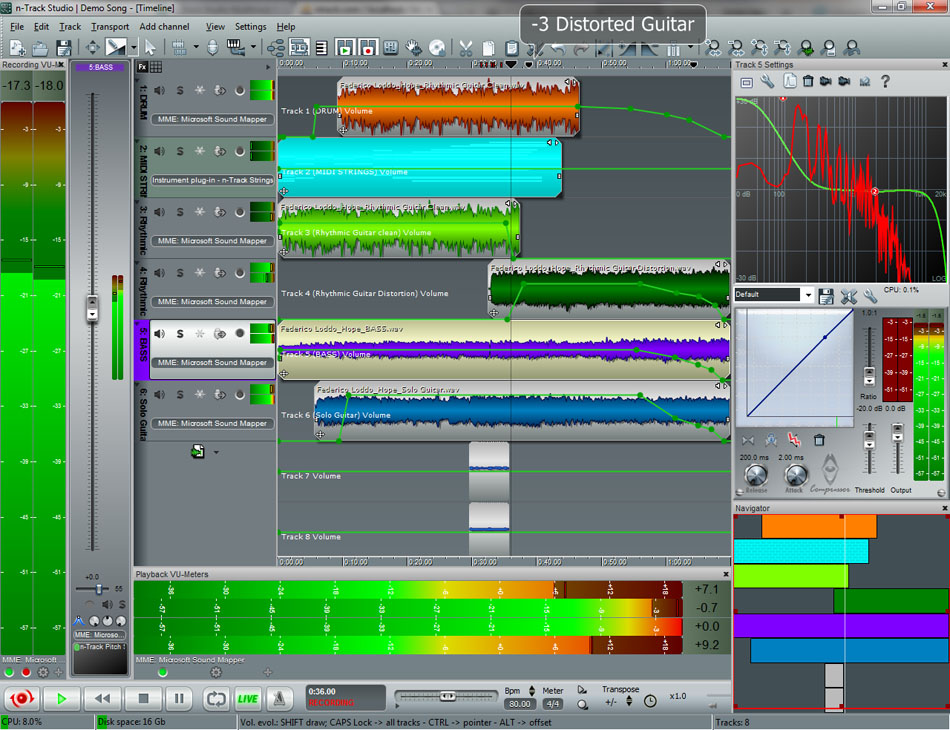
n-track Studio 6 Turn your PC into a multitrack music recording studio
The perfect tool for professional quality
audio recording and editing
Record, edit, overdub your audio tracks
apply effects, process audio live input and mix
burn audio CDs or create mp3 files
n-Track Studio specifications
Available in 32 bit and 64 bit (x64) versions. The 64 bit version runs natively on x64 versions of Windows as a 64 bit program
Supported operating system
Windows XP
Windows Vista
Windows 7
Windows Server 2003/2008
Windows ME
Windows 2000
Windows 98
Compatible with PCI, USB and Firewire (IEEE 1394) soundcards/audio interfaces with
Asio v2.2
WaveRT
WDM
MME
DirectSound
File formats compatibility (import and export):
Wave audio files (.wav)
Creates and imports broadcast wave files (bwf)
Wave64 wave files (.wav, .w64)
Mp3 compressed audio files (.mp3)
Aiff audio files (.aif, .aiff)
Wma compressed audio files (.wma)
Ogg Vorbis compressed audio files (.ogg)
Flac compressed audio files (.flac, .fla)
Standard MIDI files (.mid)
EDL files for exchanging multitrack songs with 3rd party multitrack editing programs (.edl, .txt)
CD audio tracks (.cda)
n-Track multitrack song files (.sng, .sgw)
VST plugins banks/presets (.fxb, .fxp)
Records and plays back a virtually unlimited number of audio and MIDI tracks, depending on your computer’s speed
Realtime Audio effects can be added to each channel (track, aux, master, group, instrument)
Adjust the effect settings and listen to the result in real time
Built-in effects include
Reverb
Compression
Parametric EQ
Graphic EQ
Echo
Auto-volume
Pitch Shift
Chorus
Multiband Compression
Spectrum analyzer
Drum machine/synth
Third party plug-ins supported
VST3
VST 2.x
DirectX
ReWire
Optimized for multi-core and hyperthreading CPUs: n-Track's multithreaded design takes advantage of extra CPUs processing power to allow using more tracks and effects. Depending on the song structure and buffer size the gain over a regular CPU can be around 1.7x (dual-core) or 1.1x (hyperthreading)
Supports 16 and 24 bit single and multichannel soundcards
Internal signal path uses 64 bit double precision math for the maximum audio quality available on today's CPUs
Waveforms of tracks being recorded are updated in realtime
Supports sampling frequencies beyond 192 Khz
Supports VST Instruments and DirectX Instruments synth plug-ins: sample-accurate MIDI tracks can be sent to VSTi/DXi software MIDI synths, without the need of expensive hardware MIDI synths
Live input processing allows to process with plug-ins live signals. Record the 'dry' (unprocessed) signal while processing and reprocess the recording later - i.e. play a guitar through a distortion plug-in then change the distortion after the recording!
Supports surround mixing for creating DVD audio projects using 5.1, 6.1 and 7.1 channels surround formats
Change tracks speed with or without changing pitch with speed and transpose controls for whole song, tracks and individual tracks .wav files
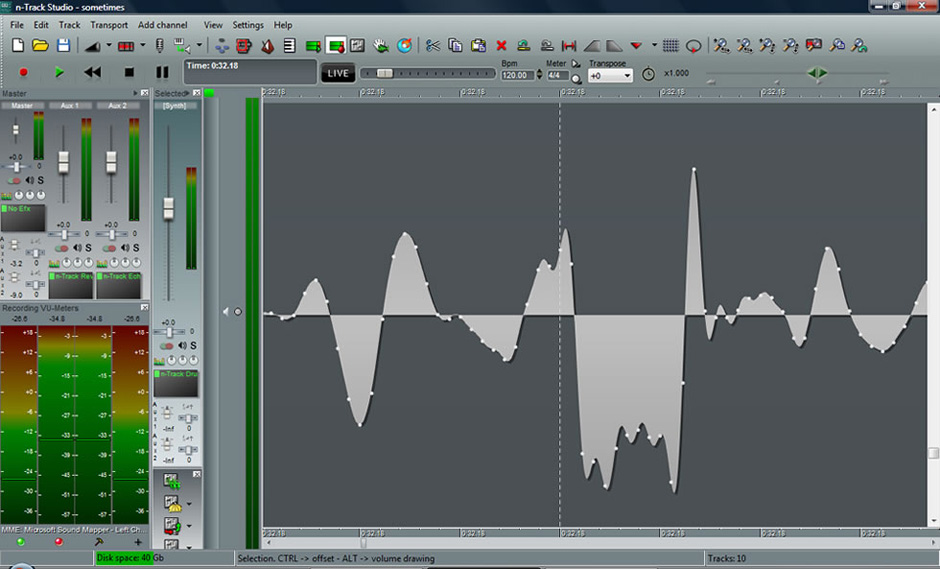
Manual editing at the single sample level (at very high zoom levels)
Each audio track includes a 20 bands parametric EQ with graphical frequency response view, a full spectrum analyzer and an automatic instrument tunerUp to 32 aux channels with fully automated sends & returns
Multiple input and output soundcards or more than one soundcard are supported: you can record multiple tracks at a time and output to more than one stereo output. Each output channels has its own master channel effects and volume contro
Supports ReWire technology by Propellerhead Software AB: signals from other programs (such as Reason, Ableton Live, Fruityloops and many others) can be mixed in realtime with n-Track's own channels
Sync to other programs or external devices using SMPTE/MTC or MIDI Clock sync, acting either as master or slave
Loads and saves MIDI tracks to standard MIDI files
Videos (AVI, MPEG) can be played in sync with the song in a dedicated video playback window
Volume, pan, aux sends & returns and effects parameters can be automated: you can "program" fade-in/outs, cross fades, boost the volume of a track when there is a solo etc.
Built-in CD burning function to automatically burn an audio CD with the song mixdown
Supports Broadcast Wave File format for easily importing and exporting .wav recordings between compatible audio software/hardware
Exporting songs in mp3 format (requires free Lame mp3 encoder module)
Recording & mixing
Records and plays back a virtually unlimited number of audio and MIDI tracks
VST, VST3, DirectX and ReWire effects can be added to each channel/track
Volume, pan, aux sends & returns and effects parameters can be automated: you can "program" fade-in/outs, cross fades, boost the volume of a track when there is a solo etc.
input processing allows to process with plug-ins live signals. Record the 'dry' (unprocessed) signal while processing and reprocess the recording later - i.e. play a guitar through a distortion plug-in then change the distortion after the recording
Soundcards & audio interfaces
Supports 16 and 24 bit single and multichannel soundcards at sampling frequencies up to 192 Khz
Compatible with Asio, WaveRT, WDM, DirectSound and MME audio drivers, which means that n-Track can work with almost any soundcard available today with the lowest possible latency
Multichannel soundcards or more than one soundcard are supported: you can record multiple tracks at a time and output to more than one stereo output. Each output channels has its own master channel effects and volume control
Effects
Built-in effects include Reverb, Compression, Parametric & Graphic EQ, Echo, Auto-volume, Pitch Shift, Chorus, Multiband Compression, Spectrum analyzer
Includes the n-Track Drums drum synth/step sequencer module
Supports third party DirectX, VST 2.x, VST 3 and ReWire plug-ins
Supports VST Instruments and DirectX Instruments synth plug-ins: sample-accurate MIDI tracks can be sent to VSTi/DXi software MIDI synths, without the need of expensive hardware MIDI synths
Supports technology by Propellerhead Software AB: signals from other programs (such as Reason, Ableton Live, Fruityloops and many others) can be mixed in realtime with n-Track's own channels
Supported formats
Imports and exports .wav, .mp3, .wma, .mid, .ogg, .flac, .aiff, .cda, .sng, .sgw audio files
Imports and exports EDL multitrack song files for exchanging songs with other multitrack programs
Sync to other programs or external devices using SMPTE/MTC or MIDI Clock sync, acting either as master or slave
Supports surround mixing for creating DVD audio projects using 5.1, 6.1 and 7.1 channels surround formats
Videos (AVI, MPEG) can be played in sync with the song in a dedicated video playback window
Once finished recording the whole song, you can mixdown all the tracks into a single wav file and to use it to record an audio CD track using a CD recorder or to distribute the song via internet using the built-in mp3 encoder.
Download
These icons link to social bookmarking sites where readers can share and discover new web pages.
Posted on Sunday, October 11, 2009
Filed under
Audio and Video Tools,
programs and computer applications
|
Put away that pile of downloadable audio and video and install this fantastic player supports all formats that you can imagine. That's right! With The KMPlayer - not to be confused with KMPlayer for Linux - you watch movies on DVDs, VCDs, video files, listen to your favorite music and more, without having to switch between programs!
It's like they merged the features and functions of Windows Media Player, RealPlayer, QuickTime, Winamp and other video players in a single application. In addition to incredible compatibility, provides an interface with support for bold skins (themes), which in turn, brings a huge collection of standard colors to make them well to your liking.
Compatibility:
AVI files incomplete or damaged (corrupted frames are skipped).
Locked files as downloaded (incomplete) or shared (if
Special to AVI format, the file is reconstructed in real time if you
being lowered in order consecutiva.S
HTTP Streaming - ASF, OGG, MP3, AAC, MPEG PS, MPEG TS.
AVI, WMV, MKV, MOV, MP4, OGG, Theora, OGM, RMVB, MPEG1, MPEG2, between
others.
Compressed Audio Album in ZIP or RAR.
Shoutcast and Icecast.
AC3, AAC, OGG, APE, MPC, FLAC, AMR, ALAC, SHN, WV, MOD, S3M MTM, UMX, XM
and IT.
Google Video (GLV), Flash Video (FLV), Nullsoft Streaming Video (NSV), 3GP, PMP,
VOB.
Archives of RealPlayer, QuickTime and Windows Media Player.
Input Plugins Winamp.
Playing DVDs, ratDVDs (needs ratDVD filters).
CD audio format CDXA (only Windows XP and 2000).
Video CD, SVCD, XCD.
VCD Image File - BIN, ISO, IMG, NRG (requires mplayer.dll).
WDM device support like TV, HDTV, camera, webcam, etc..
Files in Adobe Flash, FLC and FLI.
Several image files such as PNG, GIF, etc..
Style: Multimedia Player
Manufacturer: KMPlayer.com
Size: 12.1 Mb
Format: Zip
Language: English

These icons link to social bookmarking sites where readers can share and discover new web pages.
Posted on Saturday, October 10, 2009
Filed under
Audio and Video Tools,
programs and computer applications
|
Features
This is a list of features in Audacity, the free audio editor.
Recording
Audacity can record live audio through a microphone or mixer, or digitize recordings from cassette tapes, vinyl records, or minidiscs. With some sound cards, it can also capture streaming audio.
Record from microphone, line input, or other sources.
Dub over existing tracks to create multi-track recordings.
Record up to 16 channels at once (requires multi-channel hardware).
Level meters can monitor volume levels before, during, and after recording.
Import and Export
Import sound files, edit them, and combine them with other files or new recordings. Export your recordings in several common file formats.
Import and export WAV, AIFF, AU, and Ogg Vorbis files.
Import MPEG audio (including MP2 and MP3 files) with libmad.
Export MP3s with the optional LAME encoder library.
Create WAV or AIFF files suitable for burning to CD.
Import and export all file formats supported by libsndfile.
Open raw (headerless) audio files using the “Import Raw” command.
Note: Audacity does not currently support WMA, AAC, or most other proprietary or restricted file formats.
Editing
Easy editing with Cut, Copy, Paste, and Delete.
Use unlimited Undo (and Redo) to go back any number of steps.
Very fast editing of large files.
Edit and mix an unlimited number of tracks.
Use the Drawing tool to alter individual sample points.
Fade the volume up or down smoothly with the Envelope tool.
Effects
Change the pitch without altering the tempo, or vice-versa.
Remove static, hiss, hum, or other constant background noises.
Alter frequencies with Equalization, FFT Filter, and Bass Boost effects.
Adjust volumes with Compressor, Amplify, and Normalize effects.
Other built-in effects include:
Echo
Phaser
Wahwah
Reverse
Sound Quality
Record and edit 16-bit, 24-bit, and 32-bit (floating point) samples.
Record at up to 96 kHz.
Sample rates and formats are converted using high-quality resampling and dithering.
Mix tracks with different sample rates or formats, and Audacity will convert them automatically in realtime.
Plug-Ins
Load VST plug-ins for Windows and Mac, with the optional VST Enabler.
Write new effects with the built-in Nyquist programming language.
Analysis
Spectrogram mode for visualizing frequencies.
“Plot Spectrum” command for detailed frequency analysis.
Free and Cross-Platform
Runs on Mac OS X, Windows, and GNU/Linux.
These icons link to social bookmarking sites where readers can share and discover new web pages.
Posted on Friday, October 9, 2009
Filed under
Audio and Video Tools,
programs and computer applications,
tool and utilities
|
Camtasia Studio 6 builds on the enhancements of the last software version, like the SmartFocus feature that automatically zooms and pans to follow the action. This time it introduces HD-quality production settings that create screen recording with a dramatically smaller footprint, hot keys for the editing timeline, and video and audio tracks you can edit independently. The latter is especially useful for helping untangle a botched first-round of narration, for instance, from a perfect screen recording. In previous versions, you would just have to rerecord until you got them both right.
The new 'tilt' feature that lets you angle the video content is also neat, but is unfortunately hard to access in the Zoom and Pan editing menu. A handful of visual tweaks, including a darker, more icon-centric recording module, smooth the capture process with style.
Beyond these changes, Camtasia Studio remains largely the same powerhouse for creating and producing screencasts for the Web, mobile phones, and DVDs. Well-rounded production settings continue to present presets and tutorials to help novices; additional applications, like a standalone audio editor and the CD MenuMaker, round out the features.
The price of a creative screencasting license is steep, at $300, or $150 for an upgrade, but if the trial leaves you wanting more, Camtasia Studio is a worthwhile investment for frequent screencast producers requiring a lush feature set. Users looking to develop skills with prolonged use should start here too.
description
Train. Teach. Sell. This is the power of screen recording. Delight audiences near or far with training, presentations, demos, and screencasts that get results and look fantastic. Camtasia Studio software is smart, powerful, and makes you look like a pro.
Easily record onscreen activity, PowerPoint, webcam video, and audio. Record in front of a live audience or from your desk. Edit for professional polish, enhance for emphasis. Share HD-quality videos at any screen sizeon webpages, blogs, CDs, or portable devices like the iPhone. Make them wonder how you did it.
Operating system: Windows Vista, Windows XP
Download
These icons link to social bookmarking sites where readers can share and discover new web pages.
Posted on Tuesday, October 6, 2009
Filed under
Audio and Video Tools,
programs and computer applications,
tool and utilities
|
The Alcohol is a program that can emulate and record CDs, DVDs and now Blu-Rays.
This means that not only you record media, but keeps backup as images on your computer. These backups can be run directly from the computer without the need to write it back to a disk.
This way you keep your media intact, reducing the risk of losing them by scratches or overuse. Who got that expensive software or that precious DVD can use a copy of law and save the original.
Alcohol now fully supports the new level of qualiade industry.
Alcohol supports Blu-Ray!
Style: Burning CDs and DVDs
Manufacturer: Alcohol Software
Size: 9 Mb
Format: Rar
Language: English
With Serial number
These icons link to social bookmarking sites where readers can share and discover new web pages.
Posted on Thursday, October 1, 2009
Filed under
Audio and Video Tools,
programs and applications portable,
programs and computer applications
|
FantasyDVD Player Platinum v9.8.1 Build 730 Portable
FantasyDVD is a exquisite and powerful software DVD player. Have with the same features and controls of the living- room DVD player and support over 70 type video and audio media files. Support the ts, tp, trp mpeg2 HDTV, wmv HDTV and mkv, mka, mks formats HDTV. Its advanced video and audio technologies deliver the highest quality viewing and listening experience possible on the PC. FantasyDVD has a perfect DVD navigation system, rich audio and video effects, is stable and easy use, and can meet all the demands of DVD playing. Supports 2 - 7.1 channel audio output, dolby ProLogic, Dolby ProLogicII and SRS TruSurround XT audio output mode. Supports Low frequency effect (LFE), High frequency effect (HFE), 10 Band Equalizer, Echo\Delay etc.s expansion function.
Whether watching DVD movies on your laptop as you travel, using your computer as a second DVD player for your kids or watching a movie on your desktop as you work, FantasyDVD lets you get the most out of any computer with a DVD drive. In addition to all the features you find in your home entertainment DVD player, FantasyDVD gives you advanced functionality not possible on your living room DVD player, such as time-stretching, zooming and panning and thumbnail bookmarks. FantasyDVD allows you to customize your video and audio preferences for a personalized movie watching experience.
FantasyDVD automatically determines the type of disc in your DVD drive and uses the correct playback method for DVD titles, video CDs, or audio CDs. Play at normal speed, or fit the movie into the time you have available to watch it! Time stretching lets you decide how long the movie takes to view. If a DVD has it, FantasyDVD can handle it. FantasyDVD recognizes all of the author's DVD features and lets you access them through the FantasyDVD user interface.
FantasyDVD includes the following main features:
Optimize functions:
· Optimized for most updated CPUs and fully support MMX command sets for INTEL MMX, SSE, SSE2, AMD 3DNOW, 3DNOW PRO and has incorporated many up-to-date technologies like video hardware decode acceleration to endure high resolution picture playback.
· Advance core decoding algorithms: Utilize the new high performance CPU's capacity to reduce the blocky effect for obtaining the better video quality.
· Hardware decode acceleration enabling use of hardware moving compensation provided with VGA card.
· Offer high strength smooth playback by removing screen burrs and dithering.
Universal Player:
· To increase the compatibility with other video file format, FantasyDVD now supports the playback of Real Player file and even WMV-HD. which means FantasyDVD is able to playback a broad band of various video file format.
· Supports DivX, DVD (MPEG-2), VCD (MPEG-1), SVCD, AudioCD, MiniDVD, Mpeg2 HDTV, MWV-HDTV formats and over 70 type other video and audio media files.
Perfect playback control:
· Navigation slider allows a direct and instantaneous link to any scene.
· FantasyDVD lets you save the location of your favorite scenes, so that you can jump right to them. You can even create bookmarks at the beginning of each title chapter. FantasyDVD automatically remembers the last viewed location of a DVD.
· Broken-point Recording Function: With this function you are at your pleasure to setup broken point to watch what you are interested and replay automatically.
· Title repeat, chapter repeat, AB repeat function that lets you set your favorite scenes for instant repeat.
Rich Audio Effect:
· Features Multi-channel Environment Impression technology , an audio channel expansion technology that converts stereo sound to a multiple-channel output.
· Supports 2 - 7.1 channel audio output, dolby ProLogic, Dolby ProLogicII and SRS TruSurround XT audio output mode.
· Supports Low frequency effect(LFE), High frequency effect(HFE), 10 Band Equalizer, EchoDelay etc.s expansion function, according to own habit changes sound effect.
· Supports video/audio synchronization regulate, Make video/audio synchronize.
Rich Video Effect:
· FantasyDVD's improved color controls are like those on a standard television set. No more confusing settings. Everything is straightforward and easy to use.
· Smart aspect ratio, 4:3, 16:9, 1.66:1, various stretch, make you enjoy the DVD or media files and can acquire the best visual effect regardless.
· Digital zoom at 2X to 10X equipped with location indicator. zoom closer into the viewing area. Pan around within the zoomed are to see exactly what you want to see at exactly the level of detail you want to see it.
Time Stretch (Playback Speed):
· The time stretch feature helps you fit your movies into your schedule. For example, if you are viewing a title and need to be done at a certain time, you can speed up the playback slightly so that the title has completed by the best time for you. You can also slow the title playback down slightly in order to watch for details. With FantasyDVD's time stretching, you don't lose any of the of audio. Even with a play speed change, stereo is crisp and clear.
Play DVD Content from a Hard Drive:
· FantasyDVD lets you view DVD content stored on a device such as a hard drive or NAS appliance. Simply select the drive, folder, and the name of the .ifo (DVD format) file to begin playback. Select the folder containing the content, or create playlists containing all your personal DVD favorites.
Playing AudioCD:
· Why change players when you change discs? Play audio and video CDs with FantasyDVD. FantasyDVD detects the type of disc inserted into the drive and chooses the correct type of play. Full audio support is included with your FantasyDVD.
Image Capture:
· Capture still images of your favorite movies with the click of a button. Click once, and the current image is captured.
FantasyDVD Support the following media types:
· DVD Audio Files (*.ac3;*.dts;*.dtswav).
· DVD Audio Object Files (*.aob).
· DVD Video Object Files (*.vob).
· GZ-MC Music Files (*.mod;*.mdz;*.stm;*.stz;*.s3m;*.s3z;*.it;*.itz;*.xm;*.xmz;*.mtm).
· MPEG Video Files (*.mpg;*.mpeg;*.mpe).
· RealOne Media Files (*.ra;*.rpm;*.rm;*.rmvb;*.ram;*.rpx;*.rt;*.rp;*.smi;*.smil).
· MPEG1 Audio Files (*.mp1;*.mp2;*.mp3;*.mpa).
· MPEG1 Video Files (*.m1v).
· MPEG2 Video Files (*.m2p;*.m2v).
· MPEG2 HDTV Files (*.ts;*.tp;*.trp).
· MPEG4 Video Files (*.mp4;*.div;*.divx;*.avi).
· Windows Media Files (*.wm;*.wma;*.wmv).
· MIDI Music Files (*.midi;*.mid;*.rmi;*.kar).
· Waveform Audio Files (*.wav).
· OGG Audio File (*.ogg;*.ogm).
· AU Media Files (*.au;*.snd).
· AIFF Media Files (*.aif;*.aifc;*.aiff).
· FLAC Audio Files (*.flac).
· Matrosky Files (*.mkv;*.mka;*.mks).
· Monkey's Audio Files (*.ape;*.apl;*.mac).
· VideoCD Files (*.dat).
· Picture Files (*.bmp;*.jpg;*.gif).
Features and Improved of include:
- Add MPEG2 HDTV Files (*.ts;*.tp;*.trp) Supports.
- Add Microsoft HDTV Files (*.wmv) Supports (need the windows media player 9.0 or Higher).
- Add Matrosky HDTV Files (*.mkv;*.mka;*.mks) Supports.
- Supports 2 - 7.1 channel sound cards and output on up to 7.1 discrete audio channels.
- Supports Surround/ProLogic, Dolby ProLogicII Audio Mode, Certified Dolby Virtual Speaker technology allows you to experience virtual surround sound through 2 speakers.
- Supports TruSurroundXT(tm) Headphone, based on SRS TruSurroundXT technology, provides an optimized headphone environment. It features TruSurround, Dialog Clarity Enhancement, and TruBass technologies that bring virtual surround and virtual bass experiences to your headphones.
- Special 10 Band Equalizer for DVD playback.
- Supports True Bass \ Treble Enhancer.
- Supports Karaoke features.
- Supports Dynamic Skins.
- Add Mouse Wheel and keyboard control.
- Fixed problem in exterior subtitle, supports unicode.
- Improved shortcut function, Better keyboard operation.
- Improved audio system, supports virtual space effect and virtual environment effect.
- Add X264 format Support.
- Optimized and improved operation of user interface.
Add the user define video aspect ratio features.
System Requirements:
Intel Pentium4 2.6GHz
512 MB RAM
Microsoft Windows 2000/XP/2003
24 Bits resolution and support DirectX, 64MB Video-ROM or more
PCI sound cards, Integration chipset on mainboard, USB audio
devices etc. compatible with Windows and stereo speakers
All DVD drives
available capacity At least 30 MB
DirectX 9.0 or later
This version contains following improved:
* Improvement and optimization with windows vista32/64 compatibility
* Fixed problem with controls
* Added some small improvements
Size: 13 MB
These icons link to social bookmarking sites where readers can share and discover new web pages.